
WordPress Hosting Premium is a multisite hosting solution tailored for managing multiple WordPress websites under one account. Hosted on Google Cloud Platform, it offers centralized control, enhanced security, and scalable infrastructure which is ideal for businesses with multiple locations, educational institutions, and corporate networks.
Overview of WordPress Hosting Premium
Centralized Site Management
Manage multiple websites from a single dashboard with distinct roles:
- Network Admins: Oversee network-wide settings, themes, plugins, and users.
- Site Admins: Manage site-specific content and configuration independently.
Google Cloud Hosting
- Daily automated backups.
- Elastic scaling to handle traffic surges.
- Free SSL certificates included.
Security capabilities
- DDoS protection and Web Application Firewall (WAF) using Google Cloud Armor.
- HTTPS encryption with SSL for all hosted sites.
Developer-oriented tools
- SFTP Access.
- phpMyAdmin for advanced database access.
- Custom Domain Support for main site.
- Plugin and theme controls managed at the network level by Super Admins, with content control delegated to Site Admins.
Use case applications
Businesses with Multiple Locations
Efficiently manage all your business's sites and streamline plugin/theme updates and content deployment.
Educational Institutions
Create departmental subsites with consistent branding and independent administration.
Corporate Networks
Manage branch sites centrally with localized content updates.
Platform enhancements
- Global Content Delivery Network (CDN) for optimized load times
- Uptime monitoring to ensure availability
- Integrated Google Analytics for site performance tracking
Email hosting
WordPress Hosting Premium does not include email hosting. You can connect your preferred third-party email provider (e.g., Google Workspace or Microsoft 365) for business communications.
How to use WordPress Hosting Premium
Step 1: Activation
New Activation
- Log in to your dashboard.
- Navigate to
Accounts→Manage Accounts. - Select the appropriate account.
- Click
Order Productsand search for "WordPress Hosting". - Choose Premium from the version dropdown.
- Confirm and complete the order.
Upgrading from WordPress Hosting Standard or Pro
- Locate the existing WordPress Hosting product in your dashboard.
- Select the three-dot menu →
Change Edition. - Choose Premium.
- Acknowledge the pricing change notice and proceed.
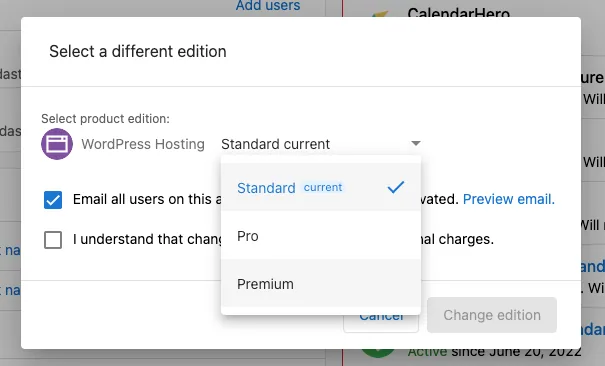
Step 2: Launching the Product
- Access the setup screen from your dashboard.
- Choose a site template:
- Use default templates, or
- Import a custom one with the All-in-One plugin.
- Define the site name, business name, and domain.
- A default domain ending in
.wp-premium-hosting.comis included.
- A default domain ending in
- Click Launch to begin site creation.
Step 3: Creating a Subsite
- Go to the WordPress Dashboard.
- Navigate to
Network Admin→Sites.
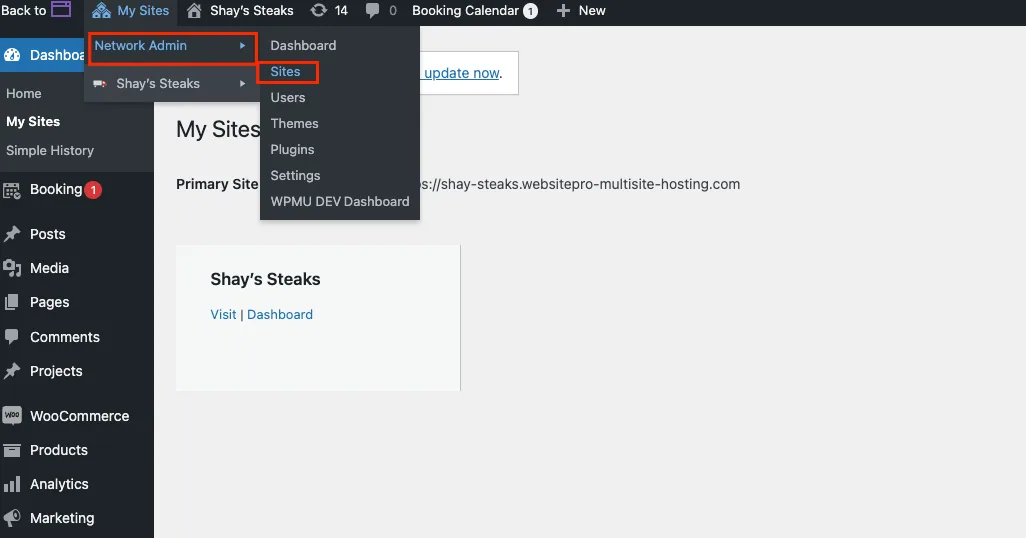 3. Select
Add New and enter:
Site Address (URL)Site TitleAdmin Email
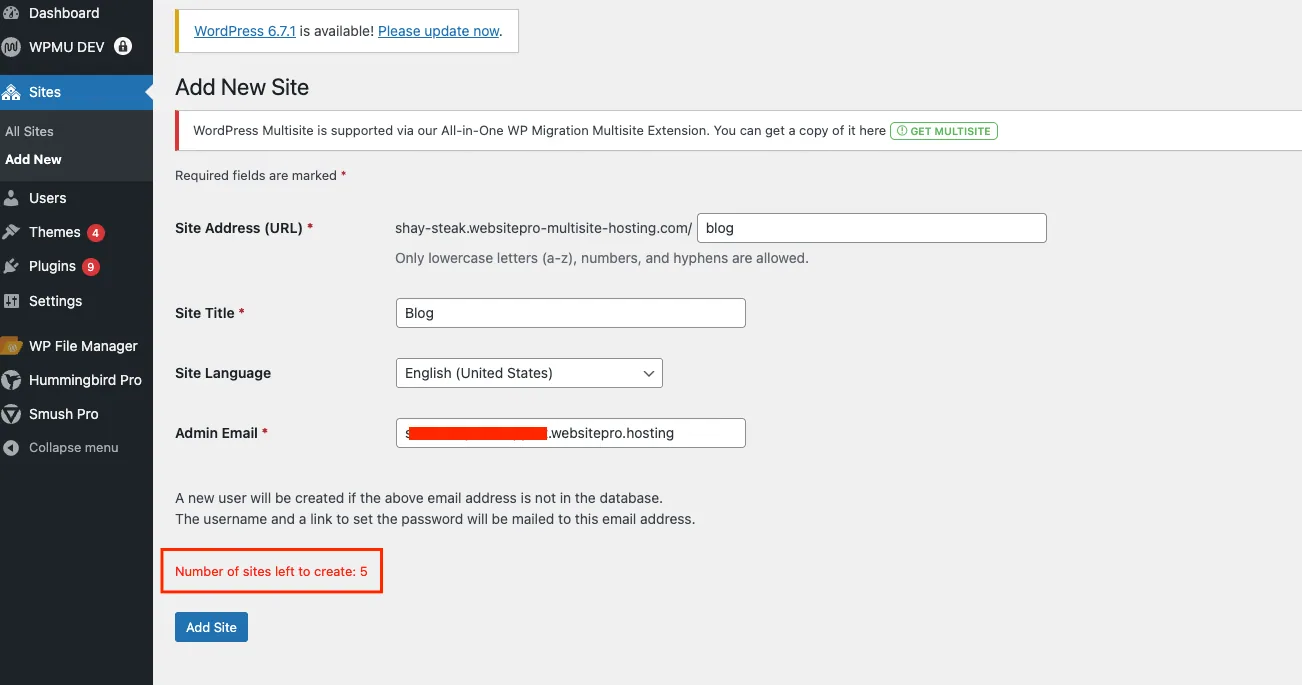
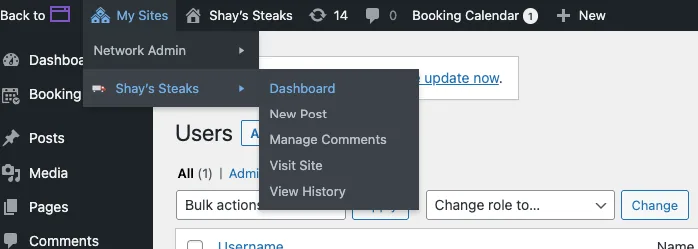
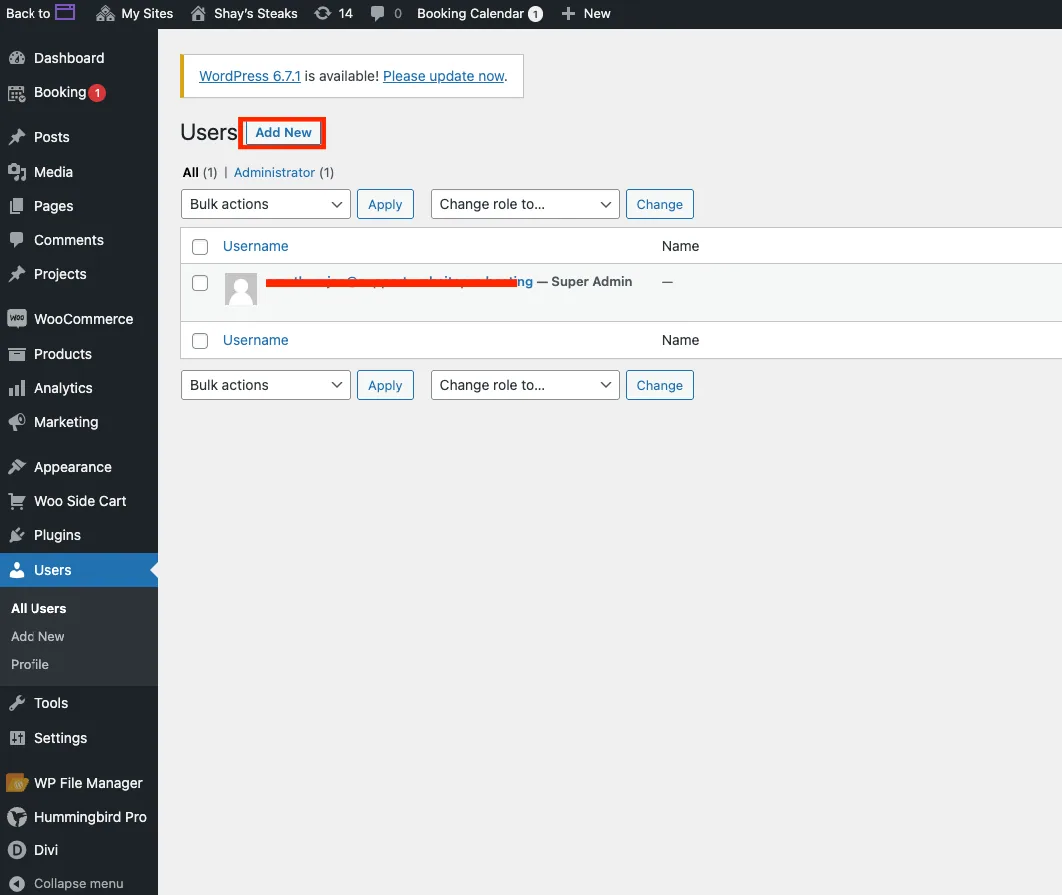
Step 4: Assigning a Site Admin
- Site Admins have access to content and settings for their assigned subsite only.
- Network Admins retain control over all plugins, themes, and global configurations.
Step 5: Connecting a Custom Domain (Main Site)
Update DNS settings through your domain registrar:
A Record
- Name:
@ - Value:
35.227.228.214
CNAME Record
- Name:
www - Value:
host.wp-premium-hosting.com
DNS propagation typically takes a few hours.
Frequently asked questions (FAQs)
A hosting solution for managing multiple WordPress sites through one interface. Ideal for businesses with multiple locations, institutions, and corporate teams.
Activate as a new product or upgrade from an existing WordPress Hosting Standard/Pro product through your dashboard.
Yes. Custom domains can be applied to the main site using DNS records.
Yes. Includes Cloud Armor protection, SSL certificates, and regular backups.
No. Only Network Admins can manage plugins and themes across the network.
Setup completes within minutes after launch initiation.
Yes. It will redirect to your Multisite domain automatically.
Yes, you can upgrade your account edition at any time through your dashboard or Marketplace. The system handles the migration of your existing site into the Premium environment.